Trailback to everything
you did on your computer.
Websites you visit, files you open, screenshots you take, text you copy.
Trailback remembers it all. Describe it, and you're back.
Pay once · Your data never leaves your computer · Mac & Windows
Offline · on this computer
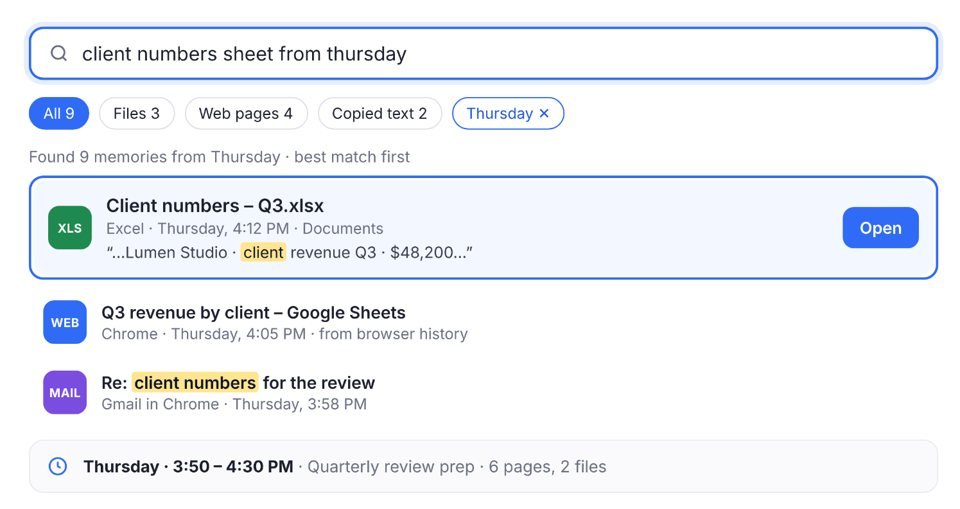
Found 9 memories from Thursday · best match first
Offline · on this computer
What was I doing?
Pick a moment and Trailback puts that time back together, in order.
Yesterday · 2:45 PM – 4:10 PM
72 minutes active · Looks like: Kitchen renovation
8 pages, 3 files and 1 app↻ Reopen all 12
Dinner on Saturday?
Term fees and dates
Your statement is ready
Launch checklist
 Trailback
FILES
Offline · on this computer
Threads
Trailback gathers each piece of work by itself. You don't file anything.
Your browser history, kept
Every page you visit,
remembered.
Works in the browser you already use. Add the free Trailback extension to your browser in one click. It saves the pages you read to Trailback on your computer, so you can find them by what was on them, even after you clear your history.
On your Mac or Windows PC.
Trailback shows you the one-click link for your browser.
Pages are remembered quietly in the background.
Private windows are never recorded. Nothing goes to a server.
Remembered


Why Trailback
Your computer does a lot.
It remembers very little.
The page, the file, the thing you copied. You saw it, you used it, and now it's gone.
Trailback01 · Describe it NEW: 9 more languages
Search in your language.
Type it the way you'd say it to a friend, in English or your own language.
Trailback looks inside your pages, files, screenshots and copied text, and shows the best match first. It reads Japanese, Chinese, Spanish, French, German, Portuguese, Italian, Dutch and Polish too.
- Finds words inside PDFs, scans, spreadsheets, slides and screenshots
- Understands “from Gmail”, and “last week” in your language
- Accents optional: resume finds résumé
Pick your languages in Settings → General. On Windows, reading words in pictures needs that language installed in Windows settings.
New · Media Tools
Add a background.
Ready to post.
Drop in a screenshot or screen recording, pick a background and a size, and save. Your original is never changed.
- Gradients, colours, a blur or your own picture
- Moving backgrounds for videos, with the sound kept
- 16:9, 1:1 or 9:16, and a Mac window frame
New · Your own shortcut
Your keys. Find it.
Drop it where you need it.
 Inbox (3) – riya@gmail.com
Gmail
Inbox (3) – riya@gmail.com
GmailAttaching the signed rent agreement. Let me know if anything's missing.
Riya
TrailbackFILES
✓ Saved. Trailback now opens with these keys, from any app.
Default: Option + Space on Mac, Alt + Shift + Space on Windows. Change it any time in Settings → General.
Opens over any app, even full screen
Drag a result into Gmail, WhatsApp or Slack
Quick answers: amounts, dates and sums
Press Esc and you're back where you were
Also new
Spreadsheets and slides
Excel and PowerPoint files, found by the words inside.
Tidy names more files
A file called scan_0412 gets a real name from what it says.
Browsers stay connected
Fix Connection tells you exactly what to do.
Text, PDF and Media Tools
Every tool has its own place in the sidebar.
02 · Collections
Your files, sorted
the way you remember.
You remember it came from WhatsApp.
Not which folder it ended up in.
Collections sort every file by what it is, the app or site it came from, and the project it belongs to. Nothing is moved, so your folders stay exactly as they are.
- By source: everything from WhatsApp, Gmail, Drive or ChatGPT
- By type: invoices, contracts, screenshots, photos
- By project: one click turns it into a real folder
The site each download came from
 WhatsApp
158 files · photos, PDFs
Gmail64 files · attachments
 Google Drive
38 files · shared docs
 ChatGPT
34 files · images, exports
Your projects
03 · Tidy
Messy files, sorted.
Only when you say yes.
“download (3).pdf”, “IMG_4823.HEIC”,
“Untitled.docx”. Sound familiar?
Trailback reads each file and suggests a real name and a proper home. Nothing changes until you click, and Undo puts it all back.
- Real names from what's inside each file
- Finds ID scans and bank statements lying around, and keeps them safe
- Shows the space you can get back: copies, old installers
Give 23 files proper names
Suggestions only. Everything can be undone.Rename all4 ID scans sitting in Downloads
Move to Private
04 · Your week
See where your week went.
Then share the good parts.
Busy all week, but can't say what you got done?
Trailback puts your week together for you: the projects you worked on, the files you made and the pages you read. It stays private on your computer until you choose to share it as a picture.
- The projects you worked on, in one view
- New files and pages read, counted for you
- Share it as a picture, or keep it to yourself
You worked on 8 projects this week.
Top projects
05 · Pick a moment
Pick a time.
See what you were doing.
“I had that slide deck open
right before Thursday's team call.”
Pick any hour of any day. Trailback lays out the pages, files and apps from that time, in order, and opens them all again with one click.
- Ask “yesterday afternoon” or “last Friday at 3”
- See what you worked on, and for how long
- Reopen everything from that time in one click
Thursday, 22 Oct
‹ Wed · Fri ›Thursday · 2:30 PM – 3:10 PM
Looks like: Getting ready for the team call · 40 minutes
Text, PDF and Media Tools
Small tools you'll use every day.
Each set has its own place in the sidebar. All built in, all offline. Nothing is uploaded.
Mail · 11:20 AMCopy
Chrome · yesterdayCopy
Copied text
Text Tools · Everything you copied, kept. Passwords and card numbers are skipped.
Delivery: 14 Nov
Grab text
Text Tools · Copy the words, amounts and links from any screenshot or photo.
Email riya@example.com
Hide private info
Media Tools · Hide card numbers, emails and phone numbers before you share.
PDF Tools
Join, split, rotate and lock PDFs right on your computer.
Mobile bill – Oct.pdf
Passport scan.pdf
Upcoming dates
Due dates and renewals, found in your files.
Media Tools NEW
Backgrounds for pictures and videos, and everyday picture jobs.
Loved by founders and builders.
Real posts on X.

Congratulations on the launch and wish you the best 🥳

finally a way to find that one pdf from three weeks ago without turning my office into a crime scene

Looks like a solid product. 🥂

Looks like a good product. Good use case. Curious what tool you used for the video generation

Consider me a fan! 🙋♂️

Congrats Pavan 👏 Trailback looks like a solid app. 🔥

Amazing 🤩🤩🤩
100% Offline &
100% Private
Your data never leaves your computer. No account, no cloud, nothing to upload.
Settings · Privacy
Choose what Trailback remembers. Everything stays on this computer.
Private windows are never recorded.
Skips passwords, codes and card numbers.
Nothing from it is ever kept.
Settings · Storage
Your memory, on this computer only.
Keep memories for
One price. Yours forever.
Pay once. No subscription.
EVERYTHING INCLUDED
- Describe it, History, Collections and Your week
- Quick Search from any app, on your own shortcut
- Tidy and upcoming dates found in your files
- Text, PDF and Media Tools, including Add a background (new in 2.7)
- Chrome, Edge, Firefox and Brave, plus Safari and Comet on Mac
- Reads your existing files from day one, in many languages
- Move your license to any of your computers
LIFETIME LICENSE
$9one-time payment
- Pay once, no subscription
- Every future update included
- Move it to a new computer any time
- 7-day refund if it's not right for you
$9 each · one license per computer
Already bought? Download Trailback
Install it, then paste the license key from your purchase email.
Mac: macOS 13 or later · Windows 10 or 11, from the Microsoft Store
Secure checkout by Dodo Payments. License key sent by email. Refund policy
Questions
Something else? Write to support@trailback.app.
Is it recording my screen?
No. It remembers what you did (pages, files, screenshots you took, apps, copied text), never your screen or passwords.
Does anything get uploaded?
No. Everything stays on your computer. It goes online only to check your license key and get updates.
Can I stop it remembering something?
Yes. Pause it, ignore any app, site or folder, or delete one item, a period, or everything.
Can I move my license to a new computer?
Yes. Use it on any of your computers, one at a time.
Does it work with files in other languages?
Yes. Search works in English, Japanese, Chinese, Spanish, French, German, Portuguese, Italian, Dutch and Polish, including the words in screenshots and scans. Choose your languages in Settings → General.
How do I activate my license?
Open Trailback, paste the key from your purchase email and click Activate. That's it.
Where do I get the Windows version?
From the Microsoft Store. Use the same license key to unlock it.
Will it slow my computer down?
No. It works quietly in the background.
Which computers does it work on?
Macs with macOS 13 or later, and PCs with Windows 10 or 11.
 Trailbackfor Mac & Windows
Give your computer
a memory.
Pay once · Mac & Windows · Your data never leaves your computer