Top 10 Mac Apps Worth Installing in 2026
Most people use the same handful of apps every day. So the best way to make your Mac better isn't to install 40 apps. It's to install the 10 that remove the most friction.
Here's our ranked list of the top 10 Mac apps for 2026. Each one is fast, works on Apple silicon, and earns its place every week. Looking for more choice? Our full guide covers the 25 best Mac apps.
Quick list: the top 10 Mac apps
| # | App | What it does | Price |
|---|---|---|---|
| 1 | Trailback | Find any file, screenshot or web page by describing it | One-time, free trial |
| 2 | Raycast | Fast launcher and command bar | Free core |
| 3 | Rectangle | Snap windows with shortcuts | Free |
| 4 | Shottr | Screenshots, annotations, OCR | Free + optional licence |
| 5 | Ice | Clean up the menu bar | Free |
| 6 | AltTab | See every window when switching | Free |
| 7 | AppCleaner | Uninstall apps completely | Free |
| 8 | Bitwarden | Password manager | Free plan |
| 9 | IINA | Plays any video file | Free |
| 10 | Stats | System stats in the menu bar | Free |
1. Trailback: find anything on your Mac by describing it
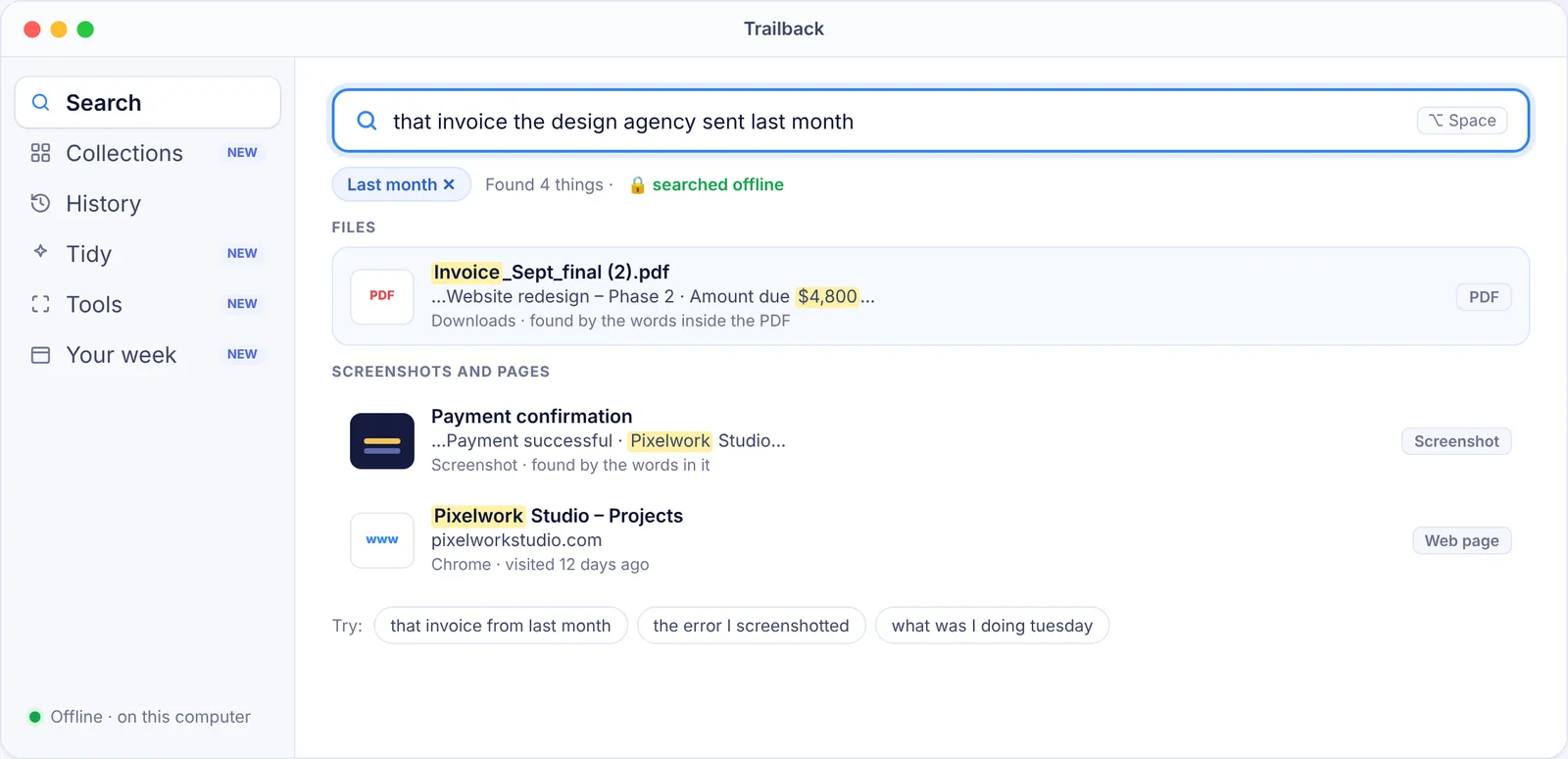
We all lose things on our computers: the PDF someone sent last month, the screenshot of an error, the article you read on Tuesday. Trailback remembers what you do on your Mac so you can find it again by describing it:
- Files and PDFs, by the words inside them, not just the file name
- Screenshots, by the text in them
- Web pages you visited, even after you clear your browser history
- What you were doing at a certain time, like "Tuesday afternoon"
It also includes Collections (your files sorted by type and source), Tidy (safe Downloads cleanup) and offline PDF and image tools. It's 100% offline: your data never leaves your computer.
Why it's #1: it fixes the problem that wastes the most time, which is looking for things. Try it free for 7 days.
2. Raycast
Raycast is a command bar that opens apps, runs quick maths, converts units, manages windows and runs extensions, all from one shortcut. The core app is free. Read more in our Spotlight alternatives guide.
3. Rectangle
Drag windows into halves, thirds and corners, or use shortcuts like ⌃⌥← to snap a window left. It's free, open source and tiny. It's one of the first things we install on any Mac.
4. Shottr
A fast screenshot app with arrows, blur, text recognition and a pixel ruler. It's free to use, with an optional licence to support the developer. If you take a lot of screenshots, also see how to search the text inside them later.
5. Ice
Your menu bar fills up fast. Ice hides the icons you don't need behind a click. It's free and open source.
6. AltTab
macOS's ⌘Tab switches apps, not windows. AltTab shows a thumbnail of every open window, which is great if you work with many browser windows or documents. Free.
7. AppCleaner
Dragging an app to the Bin leaves settings and caches behind. AppCleaner finds and removes those too. Free.
8. Bitwarden
A password manager is the single biggest security upgrade you can make. Bitwarden is open source with a free plan that covers most people. More in our privacy apps for Mac guide.
9. IINA
QuickTime can't play every video. IINA can, and it looks and feels like a real Mac app. Free and open source.
10. Stats
Want to know why your fan is spinning? Stats puts CPU, memory, network and battery info in your menu bar. Free and open source.
Honourable mentions
- CleanShot X: the most complete paid screenshot tool.
- Obsidian: notes stored as plain files on your Mac.
- Hazel: rule-based file automation.
- LuLu: free firewall that shows which apps go online.
Most of these are free. See our list of the best free Mac apps.
Find anything on your computer by describing it.
Files, PDFs, the words in your screenshots and the pages you visited. 100% offline. Your data never leaves your computer.
Frequently asked questions
What are the top 10 Mac apps in 2026?
Trailback, Raycast, Rectangle, Shottr, Ice, AltTab, AppCleaner, Bitwarden, IINA and Stats. Together they cover finding things, launching apps, windows, screenshots, cleanup, passwords, video and system monitoring.
Which of these Mac apps are free?
Rectangle, Ice, AltTab, AppCleaner, IINA and Stats are completely free. Raycast, Shottr and Bitwarden have free versions. Trailback has a 7-day free trial, then a one-time price.
Do I need all 10?
No. Start with the problem that annoys you most. If you lose files, start with Trailback. If your windows are a mess, start with Rectangle.
Pavan is the founder of Trailback, a private, offline app for Mac and Windows that helps you find anything on your computer by describing it. He builds it at Hara Infotech in Hyderabad.
Keep reading
The Best Mac Apps in 2026: 25 Picks for Every Kind of Work
Twenty-five macOS apps that earn their place on your Mac, sorted by the job they do, with free options in every group.
Top 5 Mac Apps for Productivity (That Actually Save Time)
Five Mac productivity apps, one for each part of your day, and how much time each one realistically saves.
The Best Free Mac Apps in 2026 (No Subscriptions, No Catch)
Fifteen genuinely free Mac apps, most of them open source, that are as good as or better than paid alternatives.